> ## Documentation Index
> Fetch the complete documentation index at: https://pipedform.com/docs/llms.txt
> Use this file to discover all available pages before exploring further.
# Discord
Automatically send every form submission to a Discord channel, so your team gets notified the moment someone fills out your form - right where you already collaborate.
Once connected, PipedForm will post a new message to your chosen Discord channel for every submission, including the submission date and time, making it easy to stay on top of form activity without checking your email or dashboard.
This is available on the **Paid** plan.
## Setting Up Discord Integration
Follow these steps to connect your form to a Discord channel using a webhook.
In your Discord server, create a new **Webhook** for the channel you want to receive submissions in, then copy the generated **Webhook URL**.
1. Open your Discord server
2. Right-click on the channel where you want to receive notifications
3. Select **Edit Channel**
4. Navigate to the **Integrations** tab
5. Click **Webhooks**
6. Click **Create Webhook** button
7. Click **Copy Webhook URL** button
8. Give your webhook a name (e.g., "PipedForm Bot")
9. Optionally, upload a custom avatar for the webhook
10. Select the channel where notifications should be posted
11. Click **Save Changes**
12. Click **Copy Webhook URL**
Go to **Integrations** page, **Add Integration** > **Discord**. Enter **Name** and **Webhook URL**, then **Save**.
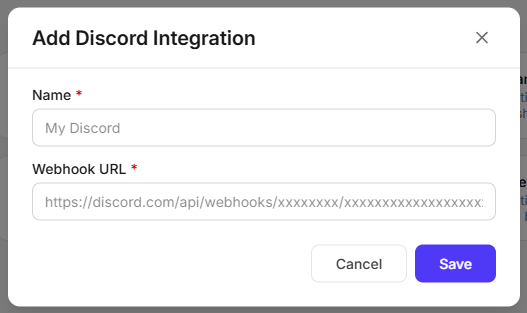 Go to your form's **Integrations** page, click **Slack Integration**.
## Data Sent to Discord
For every submission, PipedForm posts a message to your Discord channel containing:
* All submitted form field data
* `submittedAt` - the date and time the submission was received
**Notes:**
* Each Discord integration is tied to a single channel - to send submissions to multiple channels, create a separate webhook and integration for each.
* If the webhook URL is invalid or has been deleted from Discord, submissions will fail to deliver to that channel.
Go to your form's **Integrations** page, click **Slack Integration**.
## Data Sent to Discord
For every submission, PipedForm posts a message to your Discord channel containing:
* All submitted form field data
* `submittedAt` - the date and time the submission was received
**Notes:**
* Each Discord integration is tied to a single channel - to send submissions to multiple channels, create a separate webhook and integration for each.
* If the webhook URL is invalid or has been deleted from Discord, submissions will fail to deliver to that channel.